Forza Horizon 5 Error Code 0xc0000005 Fix — Silent CTD in Open World
Forza Horizon 5

Forza Horizon 5 Error Code 0xc0000005 — Silent Crash to Desktop While Driving
You're in the open world, car sounds great, map's loading fine — then 2 to 3 minutes in, the game just disappears. No error dialog on screen, no crash reporter window, nothing. You're back at the desktop like the game was never open. If you dig into Windows Event Viewer after the fact, you'll find error code 0xc0000005 logged against ForzaHorizon5.exe — an access violation that Windows caught after the process already died. It doesn't happen on the main menu. It doesn't happen in the first 60 seconds of driving. It hits consistently at that 2-3 minute mark during free roam, which tells you it's tied to something that builds up — memory allocation, background scanning, or a resource that gets accessed once the open world fully streams in. This is one of Forza Horizon 5's most reported PC issues. It's not hardware-specific in the traditional sense — players on mid-range and high-end rigs both hit it. The common thread is antivirus software running real-time protection, particularly Windows Defender and Norton, actively scanning game assets as they stream into memory.
What Causes This Error
* **Antivirus real-time scanning intercepting streamed assets** — FH5 streams large asset files from disk into memory as you drive. Windows Defender and third-party AV tools scanning those files mid-read cause an access violation when the game tries to use memory that's been locked by the scanner. * **Missing or outdated Visual C++ redistributables** — FH5 requires Visual C++ 2019 and 2022 x64 redistributables. A missing or corrupted package causes a memory access failure at the point where the game loads specific runtime components. * **Corrupted game files from a Microsoft Store or Steam update** — partial updates to FH5 leave broken asset files that cause the access violation when the streaming system hits them during open world driving. * **Pagefile too small or disabled** — FH5's open world streaming requires significant virtual memory. If your pagefile is disabled or set below 8GB, the memory manager hits a ceiling and produces an access violation crash. * **Overclocked RAM running at unstable speeds** — 0xc0000005 is a classic sign of unstable memory. RAM overclocked via XMP/EXPO profiles that aren't fully stable under FH5's sustained load will produce access violations that look identical to software crashes. * **Outdated GPU driver** — specific driver versions have known memory management conflicts with FH5's DirectX 12 streaming system. * **Xbox Game Bar or Game Mode interference** — on the Microsoft Store version, Xbox Game Bar hooks into FH5 at a process level. On some configurations this hook produces an access violation when the game's memory usage spikes during open world streaming.
Step-by-Step Fix
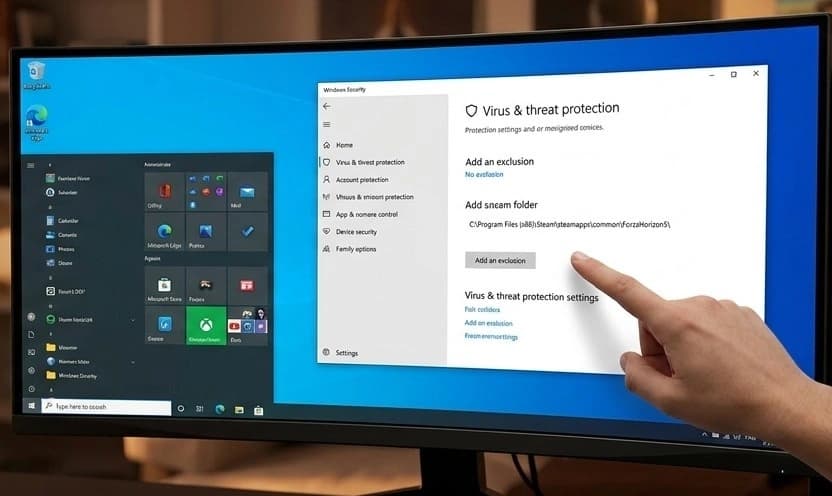
Add FH5 to your antivirus exclusions immediately — this is the fix for the majority of players. In Windows Security → Virus & threat protection → Manage settings → Exclusions → Add an exclusion → Folder, add C:\Program Files\WindowsApps\Microsoft.ForzaHorizon5_[version]\ for the Microsoft Store version, or C:\Program Files (x86)\Steam\steamapps\common\ForzaHorizon5\ for Steam. If you're on a third-party AV, add the same path in its exclusion settings.
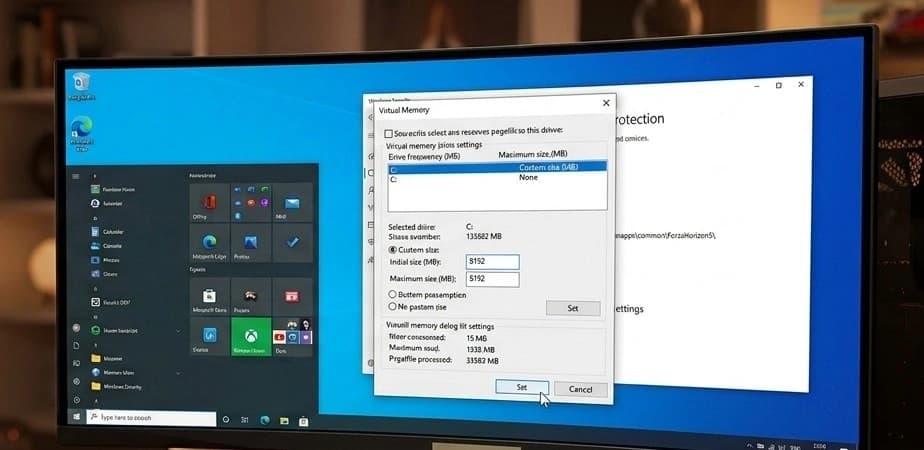
Set your pagefile to a fixed size. Right-click This PC → Properties → Advanced system settings → Advanced tab → Performance Settings → Advanced → Virtual memory → Change. Uncheck Automatically manage, select your Windows drive, choose Custom size, and set both Initial and Maximum to 8192 (8GB minimum, 16384 if you have space).
Why This Happens
Error code 0xc0000005 is Windows' access violation error — it means a program tried to read or write to a memory address it doesn't have permission to touch. In Forza Horizon 5's case, that usually happens in one of two ways. The most common cause is antivirus interference. FH5 streams game assets — car models, road textures, environment data — continuously from your drive into RAM as you drive through the open world. Antivirus tools with real-time protection scan files as they're read from disk. When the AV scanner locks a file or memory region for scanning at the exact moment FH5 tries to read it into a memory buffer, FH5 gets an access denied response on a memory address it thought was available. That's the access violation. The game can't handle it gracefully, so it crashes silently. The pagefile and RAM instability causes are different. FH5's open world streaming is memory-hungry. If physical RAM fills up and the pagefile is too small to handle overflow, the memory manager fails to allocate, and the game gets a null or invalid pointer back — another access violation. Playground Games has shipped multiple patches addressing memory management in FH5, but the AV conflict is an ongoing issue because it depends on third-party scanner behaviour that Playground can't control directly.
Frequently Asked Questions
Does this happen on the Microsoft Store version and Steam the same way?
Yes — both versions hit 0xc0000005 from the same causes. The exclusion paths differ between storefronts, and the Microsoft Store version has the additional Xbox Game Bar conflict, but the AV exclusion and pagefile fixes apply to both equally.
I added the AV exclusion and it still crashes at the same point. What now?
Check your RAM. Run Windows Memory Diagnostic — press Win + R, type mdsched, and run the extended test overnight. If it finds errors, your RAM is unstable at its current settings. Drop XMP/EXPO in BIOS and test FH5 at stock RAM speeds. A 0xc0000005 that survives the AV exclusion fix is RAM instability or pagefile related in the large majority of remaining cases.
I'm on a clean Windows install with no third-party AV, stock RAM, and a proper pagefile. Still crashes.
Verify game files first — a corrupted asset file is the next most likely cause on a clean system. After verifying, check Windows Event Viewer (Win + R → eventvwr → Windows Logs → Application) for the crash entry and look at the faulting module name. If it names a specific DLL, that narrows down whether it's a Visual C++ issue, a driver fault, or a game file problem.
I get a slightly different error — 0xc000007b instead of 0xc0000005. Is it the same fix?
Different cause. 0xc000007b means a 32-bit DLL was loaded where a 64-bit one was expected — it's almost always a Visual C++ redistributable mismatch. Install both the x64 and x86 2022 redistributables from Microsoft and reboot. That specific error code rarely needs anything beyond that.
How do I stop this happening after future Forza Horizon 5 updates?
Keep your AV exclusion in place permanently — FH5 updates don't change the install path, so the exclusion stays valid. After major updates, verify game files through your launcher before your first play session, since FH5 updates occasionally corrupt existing asset files during the patch process.
Summary
The AV exclusion fixes this for the majority of players — add the entire FH5 install folder to your antivirus exclusions and retest. That one change stops the real-time scanner from interfering with the game's asset streaming and kills the access violation. If it's still crashing after the exclusion, set your pagefile to a fixed 8GB minimum and check your RAM stability. Drop XMP/EXPO in BIOS and test at stock speeds — unstable RAM produces exactly this error and survives every other fix. For anything left after that, verify game files and install the latest Visual C++ 2022 x64 redistributable from Microsoft. If the crash entry in Windows Event Viewer names a specific DLL, that tells you exactly which component to target next.